
How to structure a SKILL.md: hierarchy and instruction order
Arrange a SKILL.md so its goal, rules, steps and checks are easy to follow. Includes an annotated outline and a downloadable Markdown template.
John McKeown
7 min read
In this note
Put each decision before the action that depends on it
Separate selection from execution
Use headings to group instructions by their job
Order the workflow by dependency
Put each decision before the action that depends on it
A useful SKILL.md makes the task's logic visible. State the intended result, identify the inputs and rules, put the steps in dependency order, and finish with the checks that justify calling the work complete.
That is a recommended writing pattern, not a required list of headings. The Agent Skills specification requires YAML frontmatter followed by Markdown, but leaves the body structure open. A short skill may need only a few paragraphs. A longer one needs sections because it contains different kinds of decisions.
Our first SKILL.md guide explains the file format and how a skill is discovered. This companion focuses on arranging the instructions once you know what the skill should do.
Separate selection from execution
The frontmatter helps describe when the skill is relevant. The body explains how to carry out the work. Mixing these jobs produces a vague description and an overloaded procedure.
For a page-review skill, the description should identify a rendered website review and the requests that call for it. Detailed rules about mobile layouts belong in the body. Conversely, a workflow should not keep repeating the sales pitch for why someone might want the skill.
Begin with a valid name and a concrete description. Then use the first paragraph of the body to define the outcome and scope. In this example, the skill reports findings. It does not silently turn a review request into permission to edit and publish.
---
name: page-review
description: Review a website page against its purpose and visual reference.
---

# Page review

Identify concrete differences between the rendered page
and its intended result. Report findings without changing code.
Use headings to group instructions by their job
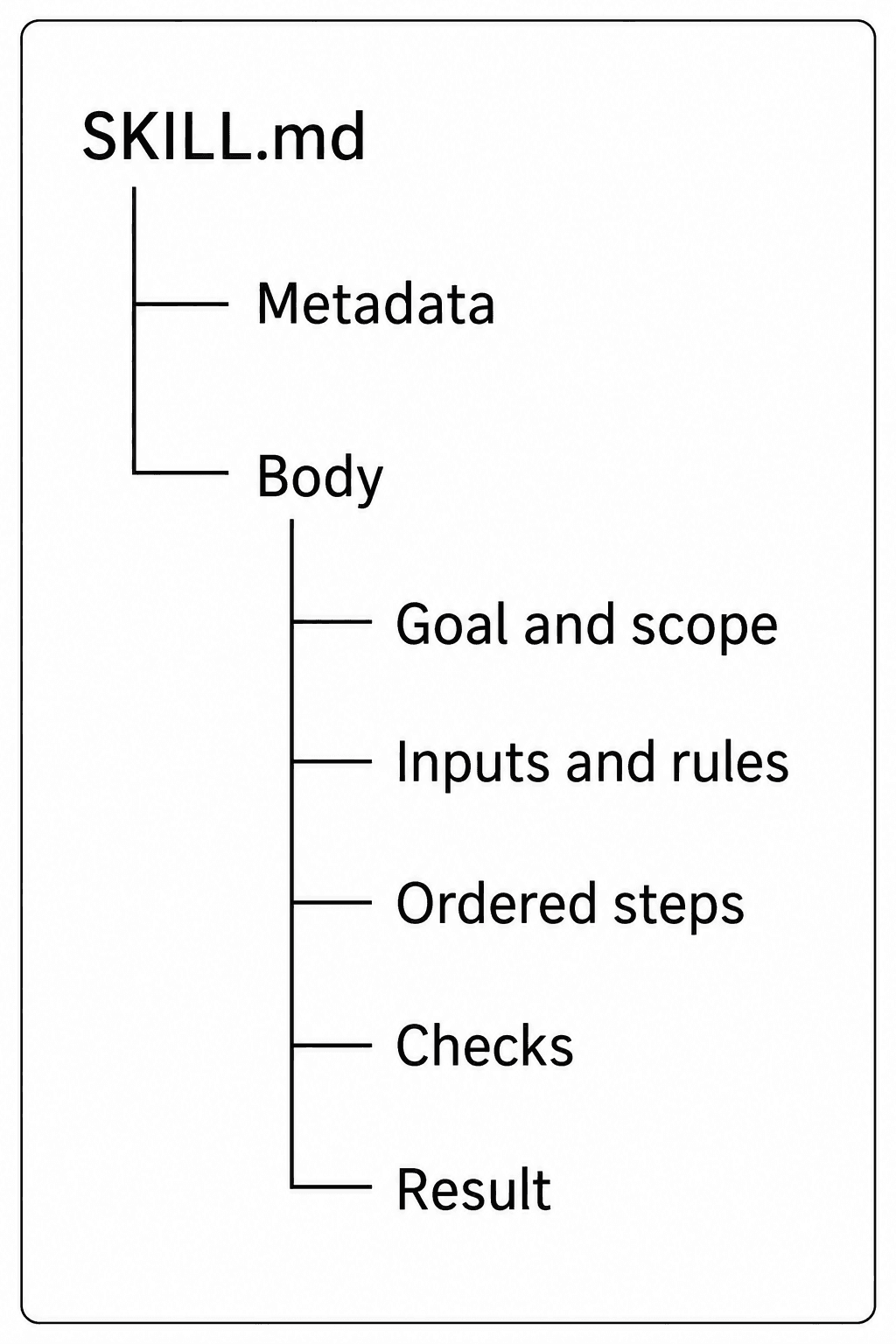
Use one main heading for the skill. Group the main responsibilities beneath it: goal, inputs, rules, steps, checks and result. Use a lower-level heading for a condition that belongs to one of those responsibilities.
For example, missing inputs belong under the inputs section. They are not another task beside the whole review. A rule about reporting an unavailable mobile view belongs with the review's evidence requirements.
Heading levels describe the relationship between sections. They do not, by themselves, grant permissions or override the host's higher-priority instructions. If two rules within the skill could conflict, explain how to resolve that conflict in prose. Making one heading larger does not settle it.
The diagram shows one possible grouping. Goal and scope share a section; inputs and rules share another. Split them when they become substantial enough to need separate treatment.
Order the workflow by dependency
Read a numbered workflow as a chain of prerequisites. If a later step needs information from an earlier one, the earlier step must produce it. If an action changes something, establish the relevant conditions before asking for the change.
A page review needs a stated purpose before it can judge whether the layout serves that purpose. It needs a rendered page before it can claim that text overlaps. It needs the findings before it can rank them. This gives the steps a reason for their order.
Compare the two sequences below. The first postpones the information needed to judge the work. The second places that information before the decision. This is a logical improvement to the instructions; it is not a measured claim that every model will follow them correctly.
Weak order
1. Improve the page.
2. Read the design brief.
3. Check what changed.
4. Decide what the page should do.

Dependency order
1. Read the brief and identify the page's purpose.
2. Inspect the current page.
3. Identify a specific difference from the intended result.
4. Make an authorized correction, if editing is in scope.
5. Render again and check the result.
Keep conditions beside the steps they change
A long warning section at the end can be hard to connect to the action it governs. Put an exception beside the relevant rule or step, and state what should happen instead.
Suppose a review requires browser screenshots. The instruction should say what to do when browser access is absent. It might allow a limited code review while requiring the report to say that the visual result is unverified. It should not let the agent substitute a passing build for an inspected page.
State the normal path first when that makes the exception easier to understand. Use a clear condition and consequence. Avoid a collection of unrelated prohibitions that leaves the agent to infer which one applies.
Inspect the rendered page at desktop and mobile widths.
If rendering is unavailable, report that limitation.
Do not describe a code-only review as a completed visual review.
Give rules, examples and checks different roles
A rule states the requirement. An example makes it concrete. A check determines whether the result meets it. Keep those roles distinct so an example does not accidentally become a second instruction.
For instance, a rule might require each finding to identify an element, a problem and its consequence. An example could describe a menu covering the main action on a phone. The check asks whether the reported problem was actually seen at the stated viewport.
Use examples whose details fit the rule. If the rule says to preserve approved copy, do not show an example that rewrites it without authorization. If a sample includes a date or a path, make clear whether it is illustrative or a required input. Anthropic's authoring guidance also treats examples and evaluation as part of developing a useful skill.
The same distinction applies to emphasis. Repeating MUST in every section makes requirements harder to distinguish. Explain the actual obligation and how it is checked.
Move optional detail out of the common path
The main file should contain enough direction for the usual case. Put long technical references or task-specific examples in supporting files when they are needed only for some tasks. Tell the agent when to read each file.
For example, a general page-review skill might refer to a separate chart-review guide only when the page contains charts. Loading that guide for a plain signup form adds reading without resolving a decision.
The format supports progressive loading of metadata, instructions and resources. Treat that as a reason to organize the material, not a guarantee that an agent will ignore irrelevant references. Check what is loaded in the client where the skill will run. Keep referenced paths real and shallow, and avoid chains of documents that send the reader back and forth.
Use the template, then test its decisions
The download below contains a complete page-review example. It has frontmatter, a goal, inputs and rules, a missing-input branch, ordered steps, checks and a reporting contract. Save it in a folder named page-review with the filename SKILL.md. Use your chosen client's documented installation method.
Read it as an example to adapt, not a universal template that every task must fill out. Remove a section if it has no job. Add a branch only when there is a real condition to handle. The file contains review instructions; it does not claim to have been benchmarked across models.
Before adopting your version, try a normal request, a request with missing input and a nearby request outside the skill's scope. Observe which instructions are used, whether the agent takes the intended branch and whether the report is justified. A valid Markdown file can still contain a poor workflow.
For website work, the final check belongs on the rendered page. At SiteSorted, fidelity means that the intended type, spacing, imagery and behavior survive implementation. A skill helps when its structure gives the agent a clear way to pursue that result and verify it.
Launch CEO read
A launch page should make the buyer, promise, proof, and next action obvious. SiteSorted uses this same standard when it turns a brief or reference site into a builder-ready page.
Start your launch build